> For the complete documentation index, see [llms.txt](https://help.holixa.com/holixa-erp-connector/llms.txt). Markdown versions of documentation pages are available by appending `.md` to page URLs; this page is available as [Markdown](https://help.holixa.com/holixa-erp-connector/whats-new/versions-29.1.0.0-28.6.0.0-27.12.0.0.md).
# Versions 29.1.0.0, 28.6.0.0, 27.12.0.0
Released on 8th August 2023
For compatibility information of each ERP Connector version with Autodesk Vault versions, visit the [System Requirements](/holixa-erp-connector/system-requirements.md) page.
## Versions 29.1.0.0 & 28.6.0.0
### Changes
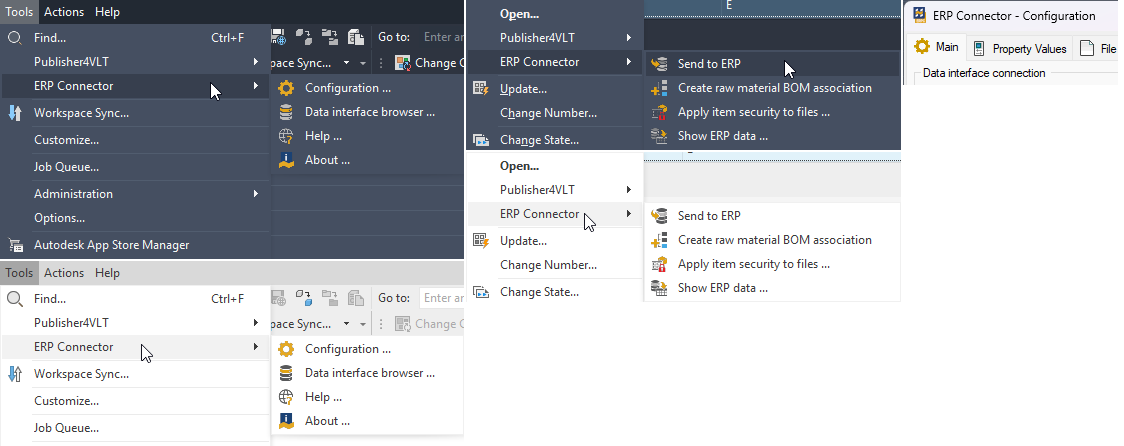
User interface icons updated to better match other Holixa applications' icon styles.
{% hint style="info" %}
Theme-based icon switching is available starting with Inventor 2024. You must restart Vault Professional to use the icon set corresponding to the selected theme.
{% endhint %}
## Version 27.12.0.0
### Changes
#### Licensing
* The latest version of Holixa licensing has been implemented.
* Licensing information is now stored in ERP Connector dedicated folder so no other Holixa-licensed products can affect the licensing of ERP Connector and vice versa.
{% hint style="danger" %}
Due to a change in license file storage folders, ERP Connector must be re-licensed.
{% endhint %}
#### General changes
* User interface icons updated to better match other Holixa application's icon styles.
### New features
* Google Analytics was implemented to track what version of the ERP Connector is being used.
### Fixes
* The wrong file path to Vault Publisher Configuration (Links tab) was fixed.